Stop scrubbing footage.
Start from your selects.
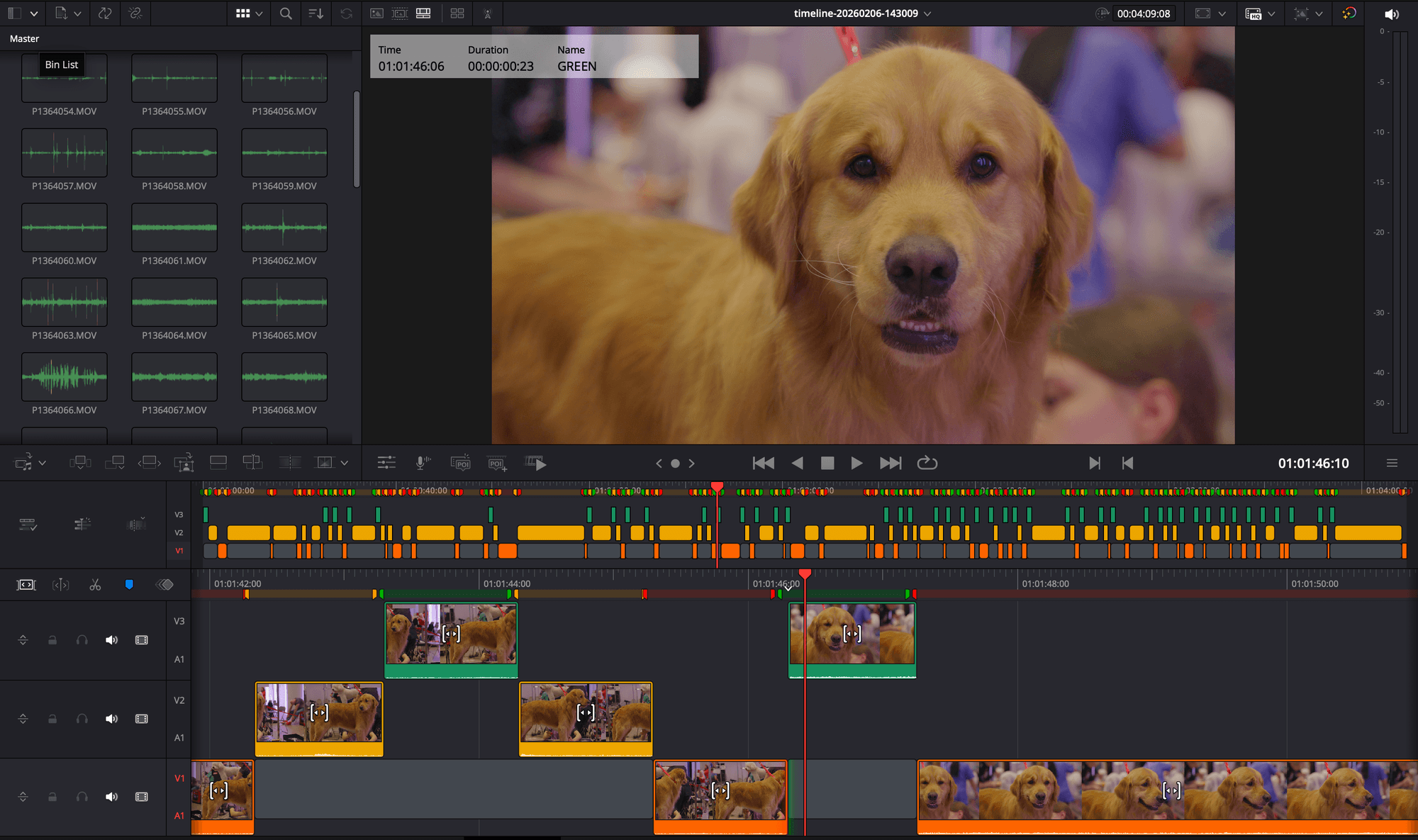
DotTrim analyzes your raw footage — scoring sharpness, stability, and exposure — and hands you a pre-selected timeline ready to import into DaVinci Resolve or Premiere Pro.
It is the step that happens before you edit. Now it takes minutes.
Built with professional videographers and editors. No gimmicks.
The footage review phase is where editing time goes to die
Before you edit a single frame, you scrub through everything. Pulling selects, logging clips, finding the usable takes — that phase can eat 40–60% of total project time. It is not editing. It is searching.
Hours of unreviewed raw footage
Multi-cam shoots, long events, and endless takes pile up fast. Before a single cut happens, someone has to watch all of it.
Endless footage scrubbing
Finding the good shots means pulling selects by hand — scrubbing every clip, again and again, just to know what you have.
Creative energy burned before the edit starts
By the time you finish reviewing footage and organizing bins, the creative momentum for the actual edit is already gone.
From raw footage to a pre-selected timeline in minutes
DotTrim is the step that happens before you open your NLE. It fits into your existing workflow — no learning curve, no change to how you actually edit.
Import footage or XML timelines
Start from raw media folders or import an XML from tools like Syncalia when your timeline is already prepared outside DotTrim.
AI scores every clip locally
On-device analysis grades each clip for sharpness, motion stability, and exposure. No uploads, no cloud — your footage never leaves your machine.
Preview, review, and refine
DotTrim marks your strongest takes as selects, flags weak clips, and lets you preview the generated timeline before committing to the export.
Export to your NLE with clip colors
Export the pre-selected timeline into DaVinci Resolve or Premiere Pro, then apply DotTrim clip colors in Resolve with the included script. Final Cut Pro coming soon.
DotTrim is not a video editor. It does the footage review and pre-selection. Your NLE — DaVinci Resolve, Premiere Pro, or Final Cut — still handles the creative edit.
Watch the pre-edit workflow before you download
This walkthrough shows how DotTrim analyzes raw footage, scores every clip, surfaces your strongest takes as selects, and hands you a pre-selected timeline to import into DaVinci Resolve or Premiere Pro — without changing the way you already edit.
Cut footage review time drastically
See how DotTrim turns hours of raw footage review into minutes of AI analysis.
Your selects, surfaced automatically
Watch how the AI scores clips and pinpoints the strongest takes from your raw material.
Drop pre-selected timeline into your NLE
Export a pre-selected sequence straight into DaVinci Resolve or Premiere Pro.
The tutorial asset stays out of the initial page payload until the user asks for it.
Get hours back before you even open your NLE
DotTrim compresses the footage review phase — moving you from raw clips to pre-selected timeline faster, especially on unstructured shoots.
3–6 hours
Save 3–6 hours of footage review on a full-day event
~50%
Cut pre-edit review time by ~50%
Less scrubbing
Spend less time scrubbing raw footage
Selects first
Open your NLE with selects already marked
Ready to try DotTrim on your next shoot?
Grab the latest build and see how much faster the footage review phase can feel.
Results vary by project size and shooting style.
Built for the footage review step
Every feature exists to compress the pre-edit phase — reviewing footage, pulling selects, flagging rejects — into something that takes minutes instead of hours.
XML import from existing timelines
Bring in XML exports from tools like Syncalia and start analysis from an already prepared timeline instead of rebuilding the project from scratch.
Timeline preview before export
Preview the generated timeline inside DotTrim, tweak your settings, re-run the analysis, and quickly check the result without jumping back to your NLE.
DaVinci clip coloring
Apply DotTrim's red, yellow, and green ratings directly in DaVinci Resolve with the included clip-color script.
Instant clip scoring
AI evaluates sharpness, motion stability, exposure, and composition for every clip in seconds.
Reject flagging
Flags blurry, shaky, underexposed, or otherwise unusable footage so you never cut from bad takes.
Privacy-first, fully local
All analysis happens on your machine. No uploads, no cloud. Your raw footage never leaves your computer.
Made for videographers and editors who value their time
Whether you shoot weddings, cut documentaries, or produce YouTube content, DotTrim compresses the footage review phase so you walk into your NLE with selects already marked.
Professional Editors
Working with corporate videos, documentaries, or branded content. Arrive at your multi-cam session with selects already pulled.
Videographers
Shooting weddings, events, or live performances. Spend less time reviewing footage in post, more time with clients.
Small Studios
Teams handling volume work. Scale your output by automating the pre-edit review, not by scaling your headcount.
Content Creators
YouTube producers, course creators, and podcasters. Skip the scrub, focus on storytelling inside your NLE.
Ready to test DotTrim with your footage?
Download the latest build and let DotTrim pre-select your next project before you open your NLE.
Download DotTrimSimple, transparent pricing
Start with a 30-day free trial and upgrade only when you are ready. New accounts verify a card to start their trial.
Got a code from an event, contest or partner? Turn it into free months.
Frequently asked questions
About the footage pre-selection workflow, supported NLEs, and how DotTrim fits alongside your existing editing tools.
Try DotTrim on your next project
Download the desktop app, create your account, and your free trial starts after you verify your payment method on NETOPIA's secure page.